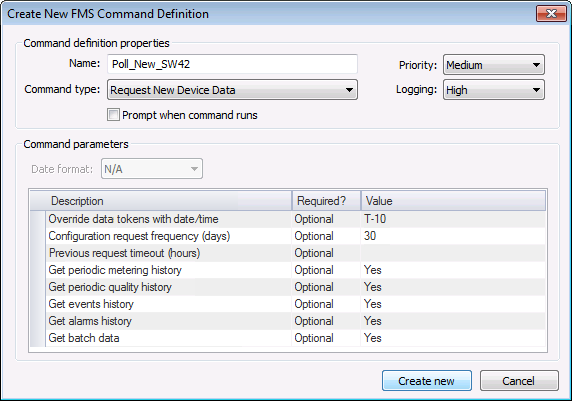
For each eligible device the Request New Data command resolves to, the service will ask the device to send back all new data that has come in since the last request of this type.
See FMS Commands and Request New Data for more information about this command.
See Scheduling FMS Command Tasks in the MSS for more information about scheduling commands.
See FMS ActiveX Controls and CxHmiFms for more information about using commands via FMS ActiveX controls on CygNet Studio or CygNet Vision screens.
See CxFms for more information about scripting commands.
See Special FMS Command Notes for more information about retrieving event and alarm data with this command.
To Configure a Request New Data Command
The following command definition properties apply to Request New Data commands.
| Property | Description |
|---|---|
|
Name |
Type in a Name for the new command. |
|
Command type |
Select the desired Command type from the drop-down menu. See FMS Commands for more information about available command types. |
|
Priority |
Select a processing queue Priority for the command from the drop-down menu. Options from least to greatest priority are as follows.
Default value is Low level processing queue priority. |
|
Logging |
Select a Logging level for the command results from the drop-down menu. Options are as follows.
Default value is Low level logging when scheduling a command in the MSS. Default value is High level logging when creating or running an ad-hoc command in FMS Explorer. |
|
Prompt when command runs |
Click to select/clear the check box to Prompt when command runs. Selecting this option means you will receive a prompt asking if you want to modify the parameters before the command is executed. |

The following command parameters apply to Request New Data commands when creating or editing commands via FMS Explorer.
| Description | Value |
|---|---|
|
Date format |
Select the desired date format from the drop-down menu. Options are as follows.
Default value is Device time. |
|
Override data tokens with date/time |
If used, specifies the date/time to use to override the data tokens, in order to allow retrieval of data from a specific time. This may be necessary if the device loses power or is reset, resulting in the data tokens becoming invalid. Click ... to Select Date and Time. See Selecting Date and Time for more information. This parameter is optional. |
|
Configuration request frequency (days) |
If used, specifies the frequency at which the command will request a configuration record in addition to the other data Type the number of days into the value field. This parameter is optional. |
|
Previous request timeout (hours) |
If used, specifies the time interval before which the request will timeout if it hasn't been completed by the UIS Type the number of hours into the value field. Each device is only allowed a single outstanding poll (per type) at a time. This parameter is optional. |
|
Get periodic metering history |
If set and configured in the device properties, will request the periodic metering history records within the time range Options are Yes or No. This parameter is optional. Default value is Yes. |
|
Get periodic quality history |
If set and configured in the device properties, will request the periodic quality history records within the time range Options are Yes or No. This parameter is optional. Default value is Yes. |
|
Get events history |
If set and configured in the device properties, will request the event records within the time range Options are Yes or No. This parameter is optional. Default value is Yes. |
|
Get alarms history |
If set and configured in the device properties, will request the alarm records within the time range Options are Yes or No. This parameter is optional. Default value is Yes. |
|
Get batch data |
If set and configured in the device properties, will request liquid batch data records Options are Yes or No. This parameter is optional. Default value is Yes. |
|
Get ticket data |
If set and configured in the device properties, will request liquid ticket data records Options are Yes or No. This parameter is optional. Default value is Yes. |
|
Request missing/unavailable data |
If set and configured in the device properties, will request missing or unavailable data records Options are as follows.
This parameter is optional. Default value is Missing and unavailable data. |
See Managing Node Commands for information about editing or deleting this command.
Note: Requests can only be processed for dates occurring after the device installation date(s). Compare the device installation date(s) to the command Start and End dates before running a Request New Data command.
See Running Node Commands for information about running this command.
|
|
|

